SmartDisplay: a cutting-edge technological interface
.jpg)
The SmartDisplay is a cutting-edge technological interface designed to equip all light electric vehicles with unmatched tracking and optimization capabilities.
Featuring over 30 advanced functionalities, it accurately analyzes driving performance using detailed telemetry data. Its smart architecture facilitates route optimization, energy efficiency improvements, and real-time monitoring of vehicle parameters.
Engineered to meet the demands of electromobility, the SmartDisplay is an essential tool for the development, management, and enhancement of applications dedicated to electric vehicles.
- ✅ Advanced telemetry analysis
- ✅ Energy efficiency optimization
- ✅ Centralized access to vehicle data
Available in small, medium, and large production runs, it integrates seamlessly into projects involving the design, development, and industrialization of electric mobility solutions.
.jpg)
Design and resistance
CNC aluminum enclosure structure with sealing gaskets making it resistant to rain and outdoor elements.
A magnificent high-resolution IPS panel, covered by a 2-millimeter glass screen, anti-glare to maintain visibility even in bright sunlight, and resistant to shocks and scratches.
This assembly ensures the user always has optimal data visibility and an extremely durable tool in case of falls or use under extreme conditions.
The technology
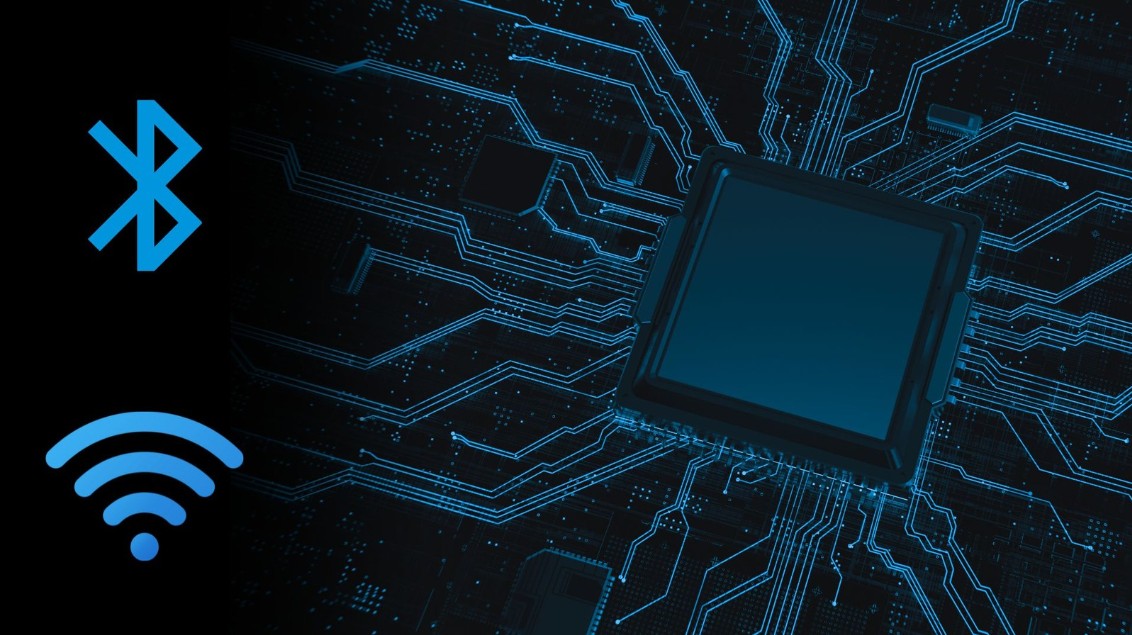
The SmartDisplay runs on an ESP32 microcontroller, which integrates Bluetooth to connect to your phone. This allows you, via the app, to manage all settings, retrieve telemetry, and use many other features. The microprocessor also integrates Wi-Fi to perform remote updates offered by Rage Mechanics.
.jpg)
GPS Navigation
With the dedicated SmartDisplay app, simply enter the destination address and the SmartDisplay automatically switches to navigation mode while maintaining the ergonomic display layout for riding.
CAN BUS communication
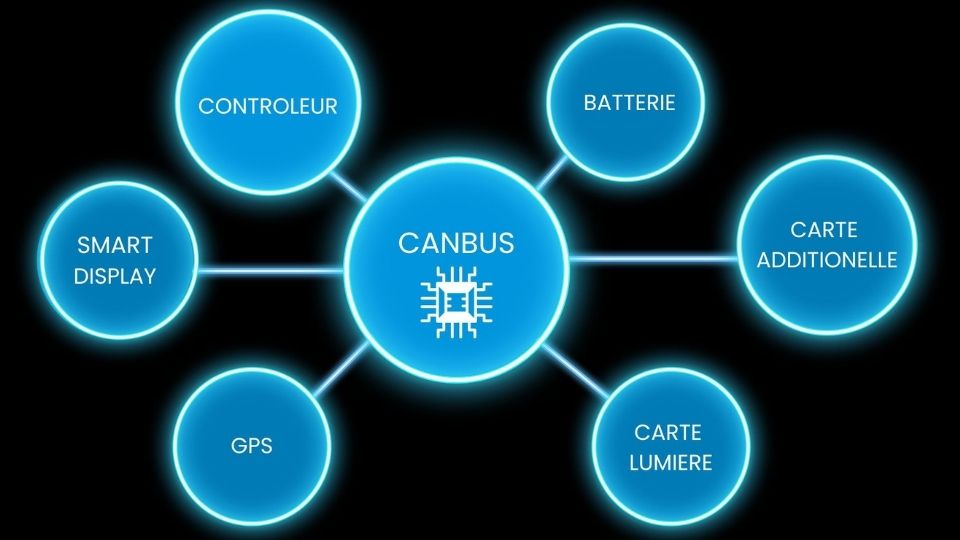
The SmartDisplay retrieves data via CAN BUS communication to display it on the connected screen. This allows for extremely fast and comprehensive data exchange.
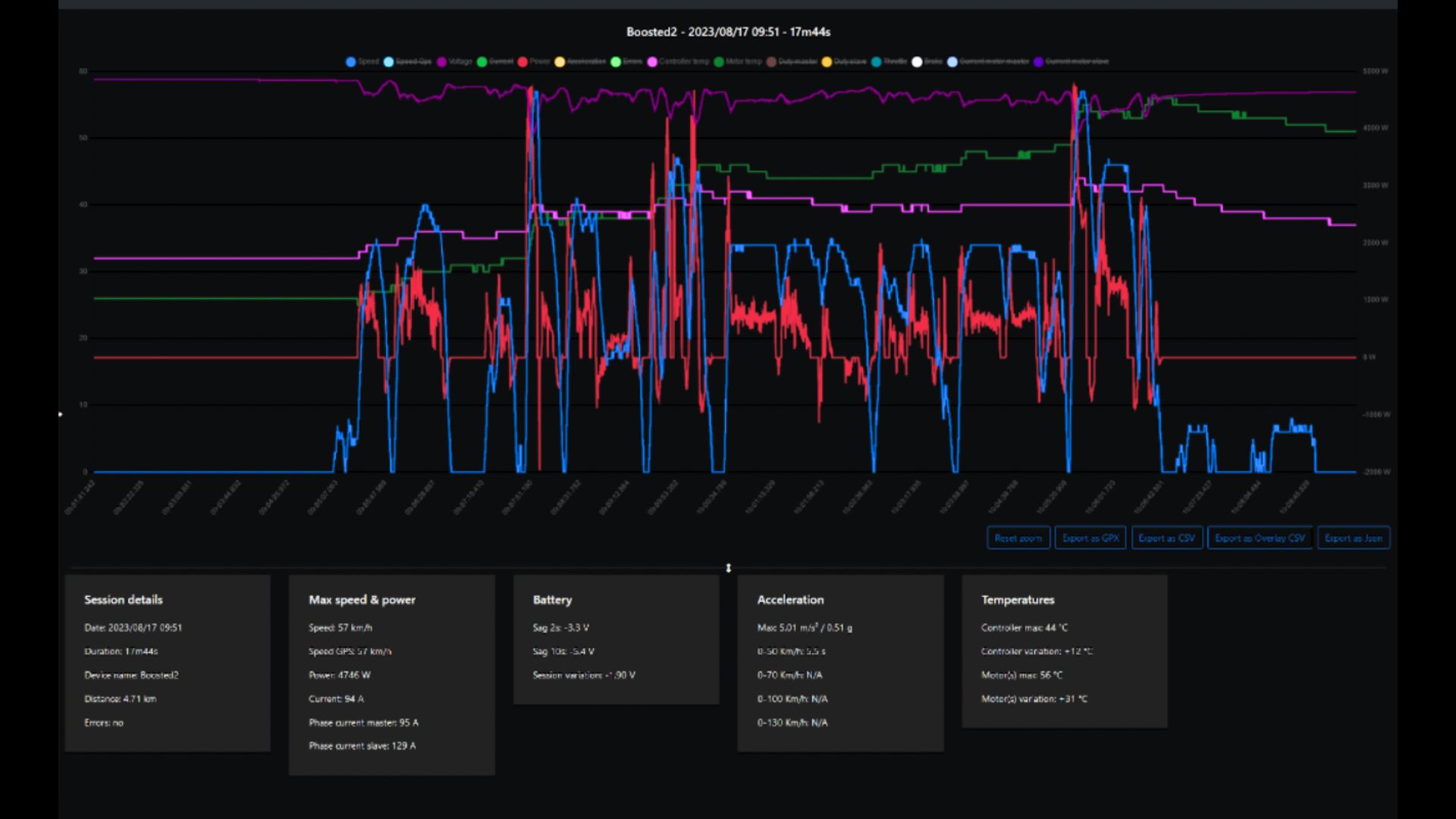
Revolutionary telemetry
Integrated telemetry, inspired by Formula 1, allows you to view and adjust your settings down to the smallest detail based on the data collected.
It gives you complete access to all your machine's data in real time.
In the context of developing or optimizing electric mobility applications, telemetry helps improve settings and detect potential issues so they do not impact the overall performance of your application.
In the world of electric scooter racing, telemetry allows you to adjust the rider's driving parameters and optimize the machine based on the observed curves.
General compatibility
The SmartDisplay can adapt to all types of electric vehicles. Both individuals and professionals have already adopted our ecosystem, whether to equip a hydrogen Tuk-Tuk, a fleet of electric scooters, or cargo bike fleets. We have the expertise to offer a custom integration solution that meets all technical constraints.
.jpg)
French engineering for an exceptional product
The SmartDisplay is the result of engineering work carried out in France since 2021 by a team dedicated to innovation and performance.
Conceived and designed with strict standards, it meets the needs of industrial manufacturers of electric mobility applications and electric mobility professionals who are looking for an advanced solution to optimize the management, ergonomics, and potential analysis of their machines.
The SmartDisplay has already been integrated into various electric mobility devices such as scooters, cargo bikes, Tuk-Tuks, motorcycles, etc...
Its versatility and reliability make it an essential tool for connected and optimized mobility..
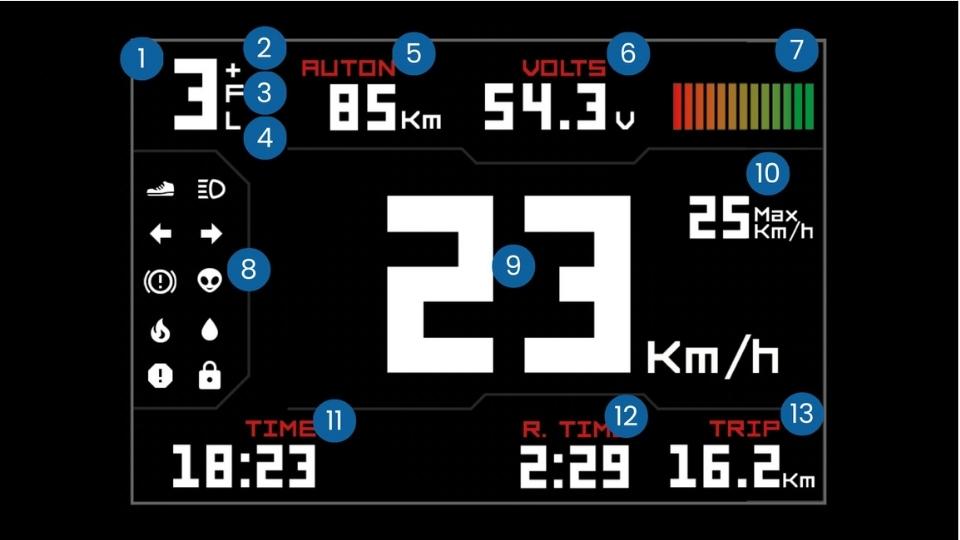
1: Speed mode (1/2/3).
2: Nitro: temporary 100% mode,
3: Acceleration mode
4: Power mode
5: Range
6: Battery voltage
7: Range bars
8: Indicators
9: Current speed
10: Max speed reached
11: Time
12: Ride duration
13: Distance traveled during the ride
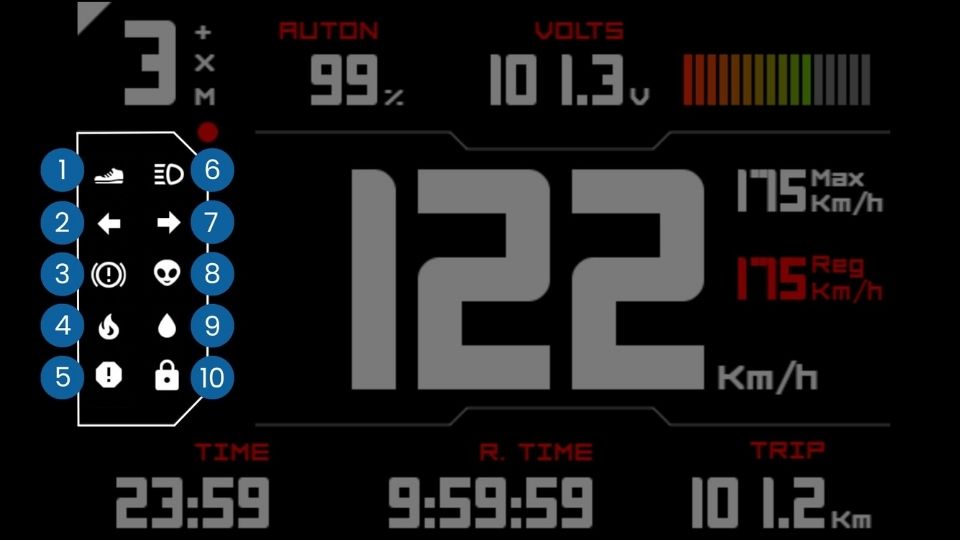
1: Push to start: if white, you need to push to start the electric vehicle
2: Turn signal: left
3: Brake: in white, the electric vehicle is braking
4: Temperature: if red, the motor or controller temperature is too high
5: Error: if red, the device reports errors; if orange, an error was recorded but resolved
6: Light: if blue, light is on
7: Turn signal: right
8: Special action: defined in settings
9: Humidity: if red, humidity is too high
10: Lock: if red, the SmartDisplay is locked manually or via Bluetooth
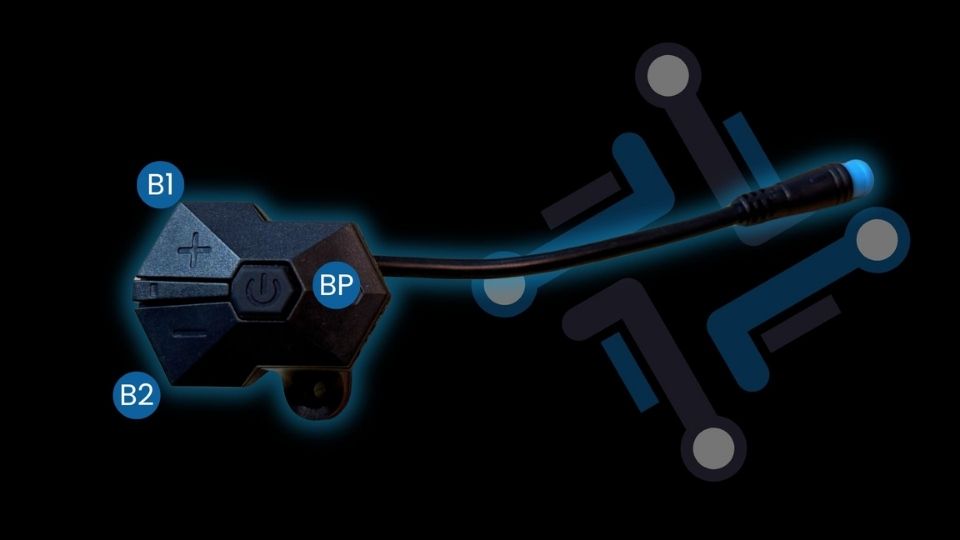
The shortcuts on the included button housing are fully customizable with over 20 possibilities via the SmartDisplay mobile app. You can choose your speed modes, turn the music volume up or down, or activate your turn signals. The shortcuts are customizable to perfectly adapt to your machine and how you use it.
The only mandatory controls are turning the machine on and off (1 click: turn on / Long press: turn off), activating nitro mode (long press on B1), and activating the lock (long press on B2).
Default button actions:
B1
1 click: Change speed mode
2 clicks: None
3 clicks: Enable cruise control
5 clicks: Enable speed limiter
Long press: Enable nitro mode (cannot be changed)
B2
1 click: Change ECO mode (acceleration)
2 clicks: None
3 clicks: Toggle AUX output (depending on light electric vehicle wiring)
5 clicks: Access settings menu
Long press: Enable lock (cannot be changed)
BP
1 click: turn on
Long press: turn off
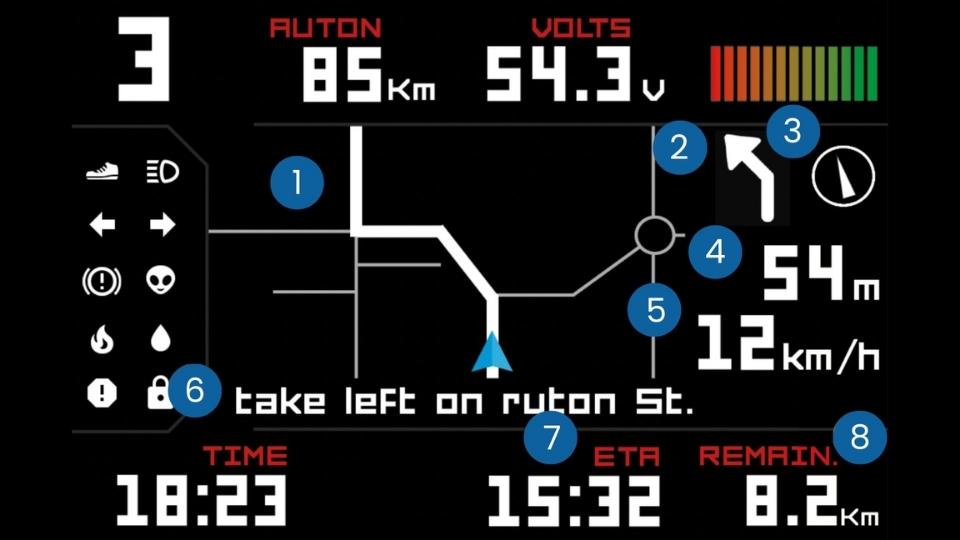
Navigation is done by entering the destination in the dedicated smartphone app. The SmartDisplay screen will instantly display the route and GPS information:
1: Map with real-time position, route to follow, and surrounding area.*
2: Direction at the next intersection
3: Compass pointing to the destination
4: Distance to the next intersection or destination
5: Current speed
6: Indicators
7: Estimated arrival time
8: Remaining distance to destination
*The GPS map zoom level can be configured in the settings.
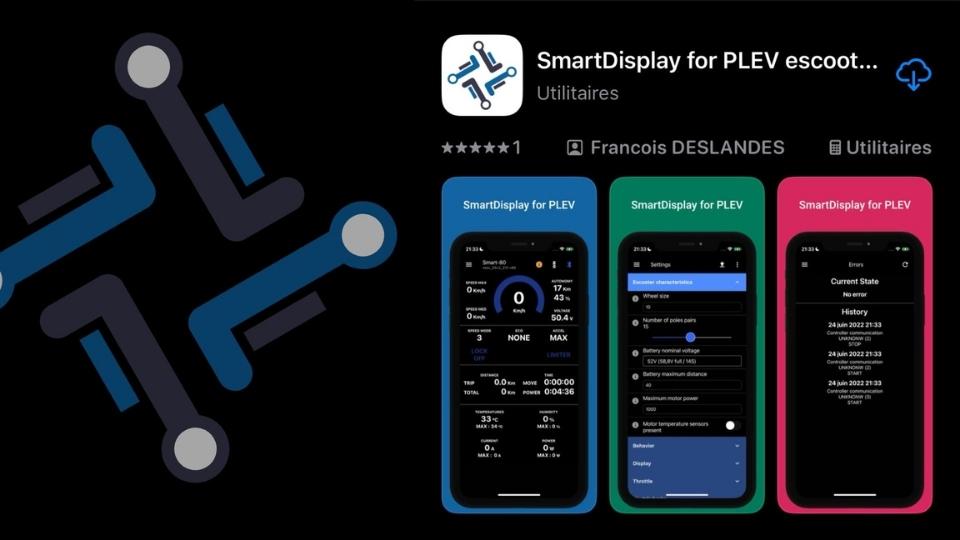
All settings for the different modes are fully customizable from the mobile app. Button shortcuts can also be configured via the app available on the Play Store and Apple Store.
The app also gives you access to all data retrieved by the SmartDisplay, such as maximum and average speeds, distance traveled, duration, and the temperatures reached by the motor, controllers, and BMS. Everything you need to analyze your ride and much more.
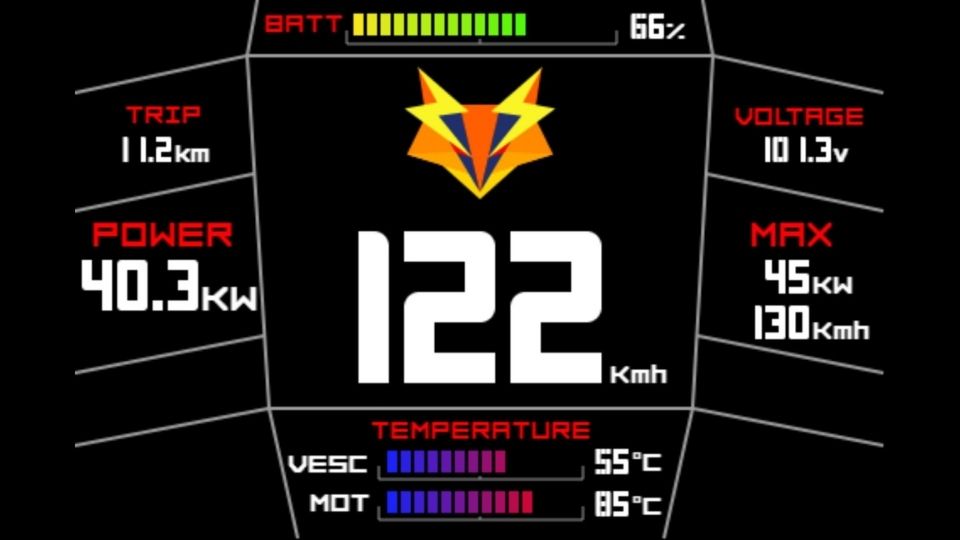
Customize the Smart Display theme 100% on the web app and import it to your display for a unique result tailored to your tastes and expectations. You decide which indicators you want to display according to your needs. Integrate your logo, text, choose colors and the size of each element... The possibilities are endless to create a SmartDisplay that reflects your image and meets your highest standards.